
What is raw photography: a guide for enthusiasts
TL;DR:
Raw photography captures unprocessed sensor data, offering greater tonal depth and editing flexibility. It serves as a digital negative, enabling full recovery of highlights and shadows, but requires dedicated software and post-processing to produce a finished image. While JPEG provides instant ready-to-use photos with automatic adjustments, raw files preserve authenticity and are ideal for complex editing scenarios.
Raw photography is the practice of recording uncompressed, unprocessed data directly from a camera’s image sensor, giving you complete control over every aspect of the final image. Unlike JPEG, which applies in-camera processing the moment you press the shutter, a raw file is a digital negative. It holds everything the sensor captured, untouched. Formats like Canon CR3, Nikon NEF, and Sony ARW each store this data in proprietary structures, and software such as Adobe Lightroom or Capture One is required to convert and edit them. If you want the purest starting point for your images, raw is where that begins.
What is raw photography and how does it technically work?
A raw file stores the brightness and colour readings from every pixel on your camera’s sensor with minimal in-camera alteration. Nothing is sharpened, no contrast is applied, and white balance is recorded as metadata rather than baked into the pixels. What you get is the full, unfiltered output of the sensor at the moment of capture.
The difference in data depth between raw and JPEG is substantial. A 12-bit raw file records 4,096 tonal levels per colour channel, while a 14-bit file records 16,384 levels. A standard 8-bit JPEG records just 256 levels per channel. That means a 14-bit raw file contains up to 64 times more tonal information than a JPEG, which translates directly into smoother gradients, better shadow detail, and far more room to recover highlights.
Raw files are proprietary to their manufacturers. Canon uses .CR3, Nikon uses .NEF, and Sony uses .ARW. Each format maps sensor data to the camera’s specific sensor geometry before any conversion takes place. This is why you cannot simply open a raw file in a standard image viewer without dedicated software.
One thing that surprises many new photographers is that raw images appear flat and dull straight out of the camera. This is entirely normal. The image has not been processed yet. Think of it as undeveloped film. The detail and colour are all there, waiting to be drawn out through editing.
Pro Tip: If your raw files look grey and lifeless on first import into Adobe Lightroom, do not panic. Apply a starting preset or manually lift the exposure and add contrast. You will immediately see the image’s true potential.
Raw files are typically 30 to 80 MB per image, compared to 5 to 20 MB for JPEG
Bit depth determines how many tonal levels are available per colour channel
Proprietary formats require brand-specific or third-party software to open
The flat appearance of raw files is a feature, not a flaw
How does raw photography compare to JPEG?
JPEG is a finished product the moment it leaves your camera. The processor applies white balance, sharpening, noise reduction, and contrast automatically, then compresses the file and discards the data it considers unnecessary. The result is a smaller, shareable file that looks polished immediately. The trade-off is that the discarded data is gone permanently.
Raw preserves everything. White balance, sharpening, and contrast remain fully adjustable in post-processing without any quality loss, because they were never applied to the pixel data in the first place. If you photograph a wedding reception under warm tungsten lighting and forget to adjust your white balance, a raw file lets you correct it perfectly in Adobe Lightroom afterwards. The same mistake in JPEG produces a colour cast that is genuinely difficult to fix cleanly.
Exposure recovery is another area where raw pulls ahead. Raw files allow recovery of two or more full stops of exposure, whereas JPEG recovery degrades noticeably after about one stop. For photographers working in mixed or unpredictable lighting, that latitude is not a luxury. It is a safety net.
Feature | Raw | JPEG |
In-camera processing | None applied | Fully applied |
White balance | Adjustable in post | Baked in at capture |
Tonal levels (14-bit) | 16,384 per channel | 256 per channel |
Exposure recovery | 2+ stops | Approx. 1 stop |
File size | 30 to 80 MB | 5 to 20 MB |
Editing flexibility | Very high | Limited |
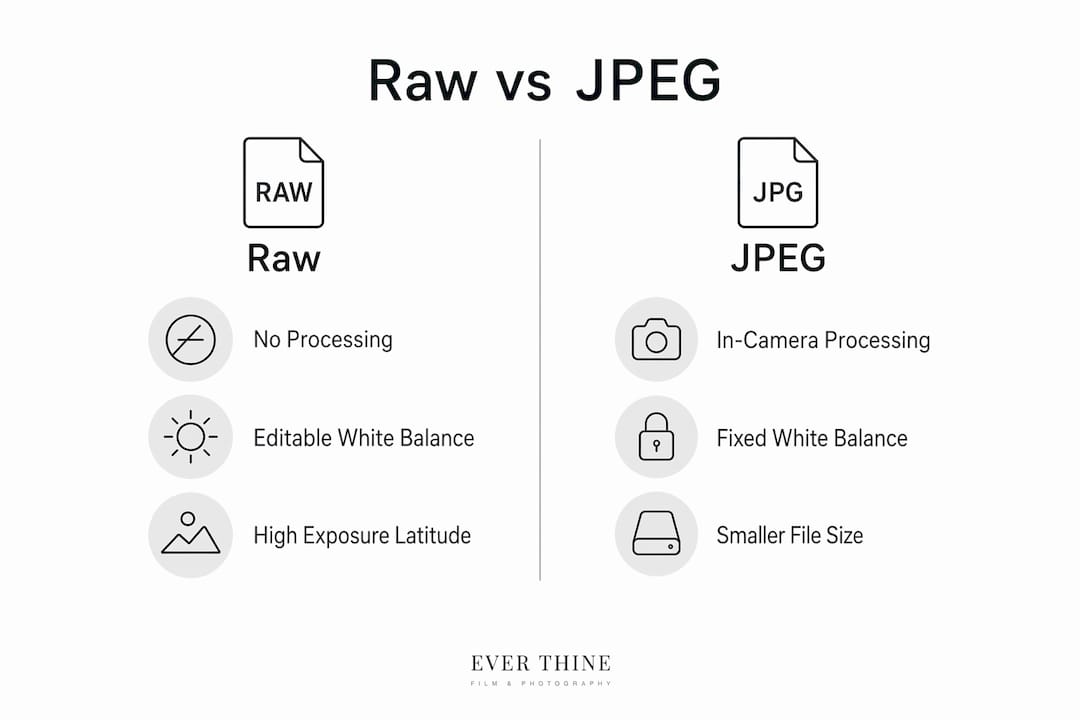
JPEG does have genuine advantages. It is faster to write to a memory card, easier to share directly, and requires no post-processing time. For sports photographers shooting bursts at 20 frames per second, or photojournalists filing images from the field within minutes, JPEG is often the practical choice. The choice between raw and JPEG should always be driven by your workflow and shooting scenario, not by a blanket assumption that raw is always superior.
What are the practical benefits of shooting in raw?
The most significant benefit of raw photography is exposure latitude. When you shoot a scene with a bright sky and dark foreground, a raw file lets you recover detail in both areas during editing. A JPEG forces you to choose which zone to expose for and accept the loss in the other.
Colour accuracy is the second major advantage. Raw files store colour in a wide-gamut internal colour space, which means adjustments to hue, saturation, and white balance are made with far more precision than is possible with a compressed JPEG. For portrait photographers correcting skin tones, or wedding photographers matching colours across a full day of varied lighting, this matters enormously.
Raw also functions as a digital negative providing authenticity. The unprocessed sensor data and embedded metadata make it significantly harder to manipulate the image without detection. For professional photographers, this is proof of the original shot. For couples commissioning wedding photography, it means the images they receive are grounded in genuine, unaltered moments.
Greater exposure latitude. Recover highlights and shadows that would be lost in JPEG, particularly in high-contrast scenes such as outdoor ceremonies in bright sunlight.
Full white balance control. Correct colour temperature in post without degrading the image, regardless of the lighting conditions at the time of shooting.
Non-destructive editing. Every adjustment you make in Adobe Lightroom or Capture One is stored in sidecar files, leaving the original raw data untouched.
Authenticity and provenance. The metadata embedded in raw files records camera settings, GPS data, and time stamps, creating a verifiable record of the original capture.
Suitability for challenging light. Weddings, landscapes, and portraits all involve unpredictable lighting. Raw gives you the flexibility to handle whatever the scene presents.
Pro Tip: When shooting a pre-wedding shoot in golden hour light, expose for the highlights and let the shadows go dark. In raw, you can lift those shadows in Lightroom without introducing the colour noise that would ruin a JPEG.
How to edit and work with raw photos effectively
The most widely used raw editors are Adobe Lightroom Classic, Capture One, and the free open-source option Darktable. Lightroom dominates the wedding and portrait photography market because of its catalogue system and batch editing tools. Capture One is favoured by commercial and fashion photographers for its superior colour rendering. Darktable offers a capable free alternative for photographers who prefer not to subscribe to Adobe’s Creative Cloud.
The editing workflow for raw files follows a consistent structure. Start with exposure and white balance, since these are the two adjustments that affect every other decision. Then move to contrast, highlights, shadows, and clarity. Sharpening and noise reduction come last, once the tonal and colour values are set. Post-processing raw files involves converting data from the sensor’s wide-gamut colour space into a viewable format, and the order of your adjustments affects the final result.
Non-destructive editing is one of raw’s most underappreciated qualities. When you edit a raw file in Lightroom, the original file is never altered. Your adjustments are saved in a separate catalogue or sidecar file. You can return to any image months later and start again from scratch. This is not possible with a flattened JPEG.
A practical workflow tip that professional photographers use regularly is shooting RAW and JPEG simultaneously. The JPEG gives you a quick preview and something to share immediately, while the raw file is available for full editing later. Most modern cameras, including Canon EOS R5 and Sony A7 series bodies, support this dual-format capture natively.
The most common mistake in raw editing is over-processing. Pushing clarity, texture, and saturation too far produces images that look artificial and heavily filtered. Raw gives you the tools to create natural, authentic results. Use them with restraint.
Common misconceptions about raw photography
The biggest misconception is that raw files are finished images. They are intended as starting points, not deliverables. A raw file straight from the camera is not ready to share, print, or send to a client. It requires intentional editing to become the final image.
A second misconception is that raw is always the right choice. For casual photography, social media content, or situations where speed matters more than post-processing flexibility, JPEG is entirely appropriate. Raw is a tool for a specific purpose, not a universal standard.
Storage is a real consideration. Raw files from a 45-megapixel camera like the Sony A7R V can exceed 80 MB each. A full wedding day of 1,500 images in raw requires significant storage capacity, both on memory cards and in long-term backup systems. Photographers who shoot raw professionally invest in fast cards, large hard drives, and cloud backup solutions.
Raw is a starting point, not a finished image
JPEG remains the better choice when speed or immediate sharing is the priority
Storage requirements for raw are substantially higher than for JPEG
Shooting raw does not automatically produce better images without skilled editing
Key takeaways
Raw photography delivers superior image quality and editing flexibility because it preserves unprocessed sensor data at 12-bit or 14-bit depth, giving photographers up to 64 times more tonal information than JPEG.
Point | Details |
Raw is a digital negative | It stores unprocessed sensor data and requires editing software to produce a finished image. |
Tonal depth advantage | 14-bit raw files record 16,384 levels per channel versus 256 in an 8-bit JPEG. |
Exposure recovery | Raw allows recovery of two or more stops of exposure; JPEG degrades after approximately one stop. |
Non-destructive editing | Adjustments in Lightroom or Capture One are saved externally, leaving the original raw file intact. |
Not always the right choice | Raw suits complex editing workflows; JPEG remains practical for speed and immediate sharing. |
Why raw changed how I think about every shot
When I first switched to shooting raw consistently, the immediate reaction was frustration. The files looked flat, the previews were dull, and the editing time doubled overnight. What I did not expect was how quickly that frustration turned into confidence.
Shooting raw changes your relationship with exposure. You stop trying to get everything perfect in camera out of anxiety, and start making deliberate choices about where to place your exposure, knowing you have room to work with. That shift in mindset produces better images, not because the technology does the work, but because you start thinking more clearly about light.
The authenticity aspect matters to me professionally. When I deliver images to couples from their wedding day, the raw files behind those images are a record of exactly what happened. The wedding detail photography workflow I use is built around raw capture precisely because it preserves the genuine quality of every moment, from the ring on the dressing table to the last dance of the evening.
My honest advice is to start with Adobe Lightroom, shoot RAW and JPEG together for the first few months, and compare the results. You will reach a point where going back to JPEG-only feels like working with one hand tied behind your back. Raw is not complicated. It just requires commitment to the process.
— Ever
Capture your wedding day in its truest form
Every image Weddingfilmphotography delivers is shot in raw format, processed through a professional editing workflow that preserves the natural colour, light, and emotion of your day. Raw capture means that even the most challenging lighting conditions, a dark church, a golden sunset, a candlelit reception, are handled with precision and care.
[
If you are planning a wedding in Derbyshire, Staffordshire, or Worcestershire and want photography that reflects the real, unfiltered story of your day, Weddingfilmphotography would love to hear from you. Explore the full range of services available for couples planning their Derbyshire wedding photography, or find out more about why professional photos are worth every penny.
FAQ
What does raw mean in photography?
Raw in photography refers to an unprocessed image file captured directly from a camera’s sensor, storing all brightness and colour data at 12-bit or 14-bit depth without any in-camera compression or processing applied.
Is raw better than JPEG for wedding photography?
Raw is generally the better choice for wedding photography because it allows full exposure and white balance correction in post-processing, and raw files recover two or more stops of exposure compared to approximately one stop for JPEG.
What software do I need to edit raw photos?
Adobe Lightroom Classic, Capture One, and Darktable are the three most widely used raw editors. Lightroom is the most popular choice for wedding and portrait photographers due to its catalogue system and batch editing tools.
Do raw files look worse than JPEGs straight from the camera?
Yes. Raw images appear flat and dull initially because no in-camera processing has been applied. This is the intended starting point and is corrected during editing.
Can I shoot raw and JPEG at the same time?
Most modern cameras support simultaneous raw and JPEG capture. This workflow gives you an immediately usable JPEG alongside a full-quality raw file for detailed editing later.
Recommended

Comments